Pricing Intelligence: find the money you're leaving on the table.
Most distributors set list prices once and forget them. Operators discount when they shouldn't and hold the line when they could move it. SideQuest reads your QuickBooks catalog and the prices you've actually charged in the last 90 days, then surfaces four patterns the human eye misses. Each finding carries a dollar impact and a one-line fix.
Get it running See the spec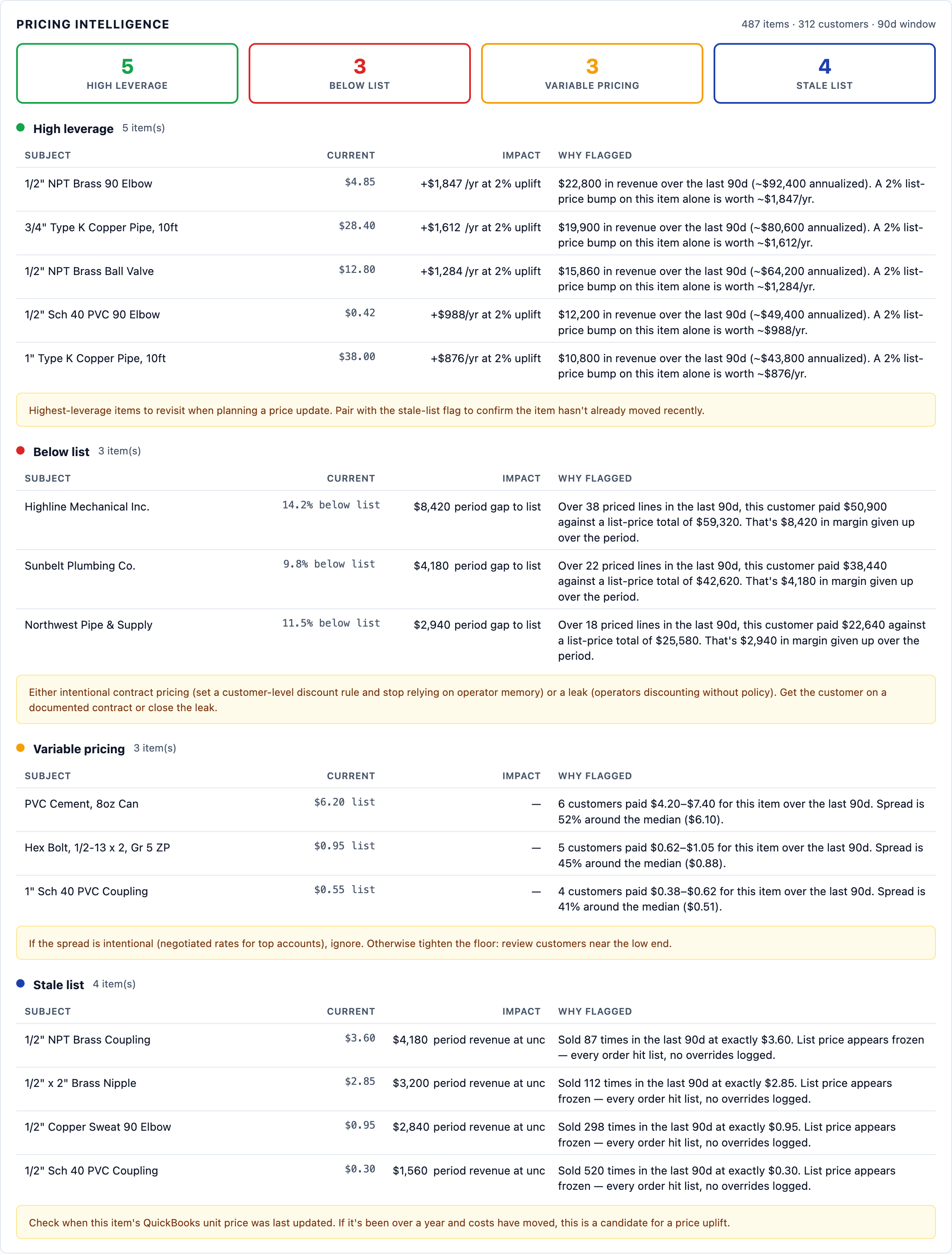
What it surfaces
Four buckets, ranked by where you can act today. Each finding shows the subject (item or customer), the current price or value, an impact estimate where quantifiable, and the operator fix hint.
Where a 2% bump matters most
Your top revenue items, ranked. For each one, the report annualizes your period revenue and tells you what a 2% list-price uplift is worth in annual dollars. The shortest path to a bigger top line.
Example: +$1,847/yr at 2% upliftCustomers paying under your list
Customers whose paid prices ran materially under your QuickBooks list across five or more priced lines in the window. The dollar gap to list is quantified. Either a forgotten contract or a leak.
Example: $8,420 period gap to listSame item, different prices
Items where the same SKU sold at materially different prices across four or more customers. Some intentional, some not. The card shows the price range and the lowest-paying customers so you can decide.
Example: 5 customers paid $80-$120 (40% spread)Prices that haven't moved
Items where every recent order paid exactly list price, no overrides. Strong signal the list price has been frozen for a long time and probably hasn't kept up with cost movement.
Example: $4,180 period revenue at unchanged listWhat it looks like
Same shape as the rest of the SideQuest dashboard. A new card sits between Customer Health and Catalog Hygiene. Four bucket pills at the top with counts, then per-bucket tables with the operator fix hint underneath each.
When to read it
Before a quarterly price review
- The high-leverage list tells you where 30 minutes of pricing work matters most.
- The stale-list bucket tells you which items haven't moved in months even though your costs probably have.
- Combine both — items that show up in both lists are the easiest wins.
Before a contract negotiation
- Pull the below-list customers list before sitting down with your top accounts. You want the conversation about pricing to be on facts, not feelings.
- If a customer is on a documented contract and is correctly priced below list, the report tells you so — formalize the rule in QuickBooks and stop relying on operator memory.
- If a customer is below list with no contract, you've found a leak. Decide whether to close it or formalize it.
After a cost increase from a supplier
- Variable-pricing items where the floor is well below your new cost are the immediate problem — surface them and fix the floor first.
- High-leverage items show you where a list bump recoups the cost increase fastest.
When your gross margin number moves
- Drop in margin and don't know why? Run the report against the prior quarter and compare. Below-list customers and variable-pricing items typically explain most of the move.
- Margin up unexpectedly? Same approach — confirm the gain came from the prices you intended to change.
Read-only by design
Pricing Intelligence never changes a price on its own. It surfaces patterns and quantifies impact; the operator decides what to do. Price changes still happen in QuickBooks (or through the standard SideQuest update_qb_item_price tool after a human review).
How to run it
Two ways. Either ask Claude in plain English, or call the tool directly from a terminal.
Then open the dashboard to see the card laid out with bucket pills + per-finding tables:
FAQ
Does SideQuest change my QuickBooks prices automatically?
No. Pricing Intelligence is read-only analysis. It surfaces patterns and quantifies dollar impact; the operator decides whether to raise a list price or hold a contract conversation. Any price change still happens in QuickBooks (or through update_qb_item_price after a human review).
How far back does the analysis look?
Default 90 days. Tunable per call. The window applies to your local drafts store — the historical line prices you have already processed. Longer windows reveal more patterns; shorter windows reflect more current behavior.
Does the high-leverage finding factor in cost of goods?
Not in v0.15.36. The 2% uplift estimate is computed against gross revenue, not margin, because QuickBooks Online does not reliably expose item cost on every Item record. If you set unit cost on your items in QB, a margin-aware variant is on the roadmap. Use the current output as "where the biggest revenue lift is" and combine it with your own margin knowledge.
Won't the below-list customer flag scare off long-time accounts I'm intentionally discounting?
The flag is informational, not a price change. It surfaces the dollar gap so you can decide. If a customer is on a documented contract, the right move is usually to formalize the discount rule in QuickBooks (or your contract system) so operators stop relying on memory. If there's no contract, you've found a leak. Either way, more information than you had this morning.
What if I'm just getting started and don't have enough draft history yet?
The report needs a handful of processed POs before the variable-pricing and below-list buckets fire (variable needs 4+ distinct customers per item, below-list needs 5+ priced lines per customer). High-leverage and stale-list buckets fire earlier because they only need item-level history. As your processed-PO history grows, the analysis gets richer automatically.
Can I tune the thresholds?
Yes. The MCP tool accepts period_days and a handful of bucket-specific thresholds (variable_pricing_min_orders, below_list_threshold, etc.). The defaults match what we see work for most distributors. Pass overrides if your shop has a different definition of "material spread" or "unusually low paying customer."
Keep reading
Operations dashboard
Where the Pricing Intelligence card lives. Plus time saved, customer health, catalog hygiene, AR snapshot, review queue.
ReferenceEvery feature SideQuest ships
Organized by category, not release date. Eleven categories, ~80 individual capabilities.
DocsQuick-start guide
From "I have a SideQuest license" to "Pricing Intelligence working on my real data" in about 30 minutes.